 Remnashop
Caddy
Proxying with Caddy
In this guide we will use Caddy as a reverse proxy to reach Remnashop. We will point a domain name at the server and configure Caddy — the certificates are issued by Caddy itself.
You need a registered domain name to continue.
Point your domain to the server
Check your server's IP address. A static IPv4 address works best.
Now point your domain name at that address, for example my-super-panel.com → 193.122.122.122.
There are two ways to do it:
- Through a DNS provider — Cloudflare, Google Cloud and the like
- Through your registrar — Namecheap and the like
DNS provider
With Cloudflare you add an A record for IPv4 or an AAAA record for IPv6.
Log in to your Cloudflare account and pick the domain. In the left column open DNS, then Records, and click Create record.
Set Type to A and Name to @.
For a subdomain, put its name — bot, for instance — in the Name field instead.
Enter your server's IP address in the IPv4 address field and click Save. DNS records take a while to propagate.
The yellow cloud (domain proxied through Cloudflare) and the grey cloud (domain not proxied) behave differently. If Cloudflare works well in your region, proxying through it is the better choice.
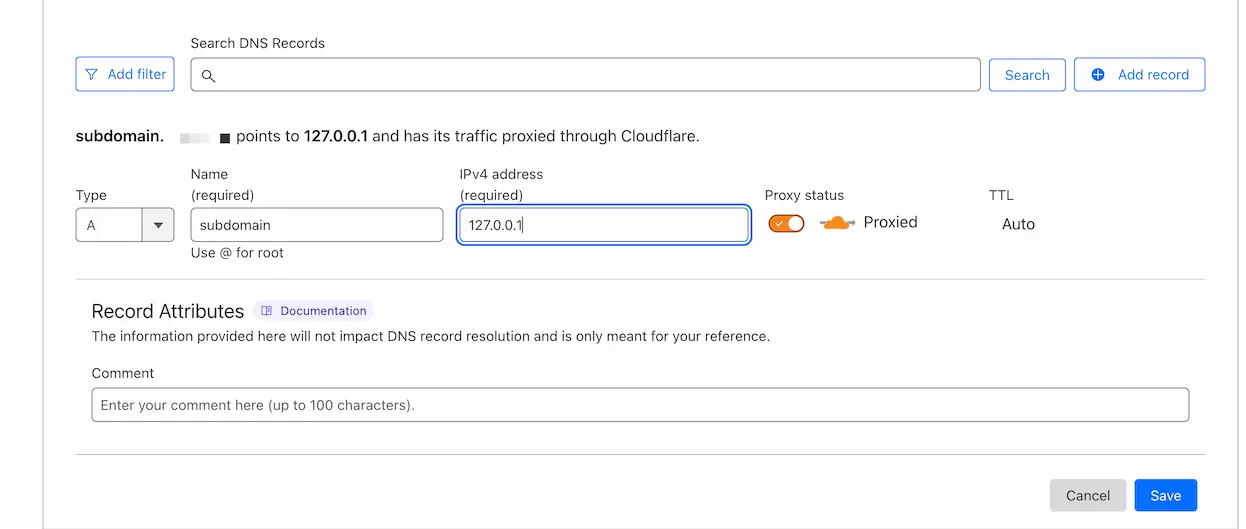
Other DNS providers look different, but the process is the same.
Caddy configuration
Caddy can run on the same server as the Remnawave panel or on a separate one. Pick the matching tab.
Caddy runs on the same server as the Remnawave panel.
Caddy must already be installed and configured on the server that runs the Remnawave panel and the other components.
Prepare the Caddyfile
With Caddy already configured, you only add a new site block to the Caddyfile:
cd /opt/remnawave/caddy && nano CaddyfileReplace BOT_DOMAIN with your domain name.
Do not replace the existing configuration — only add the Remnashop site block to it.
# PANEL
https://REPLACE_WITH_YOUR_DOMAIN {
        reverse_proxy * http://remnawave:3000
}
# SUBSCRIPTION PAGE
https://SUBSCRIPTION_PAGE_DOMAIN {
        reverse_proxy * http://remnawave-subscription-page:3010
}
# REMNASHOP (all API v1 → remnashop:5000)
https://BOT_DOMAIN {
        reverse_proxy /api/v1/* http://remnashop:5000
}
# CATCH-ALL
:443 {
    tls internal
    respond 204
}
Restart the containers
cd /opt/remnawave/caddy && docker compose down && docker compose up -d && docker compose logs -fcd /opt/remnashop && docker compose down && docker compose up -d && docker compose logs -fIf everything is configured correctly, Remnashop sends a startup notification in Telegram.